New Client Connect Updates: Site Health Monitoring, Document Vault and Service Status
We’ve added a new set of updates to Client Connect this week, designed to make it easier for our customers to keep track of important website information without needing to dig through emails, check several systems, or wait until something becomes urgent.
Client Connect is our customer portal for O’Brien Media customers. It brings together useful website information, billing, support, analytics and account details in one place. These latest updates continue that idea by giving customers better visibility over the health of their website, access to important documents, and clearer service status updates.
Site Health Monitoring
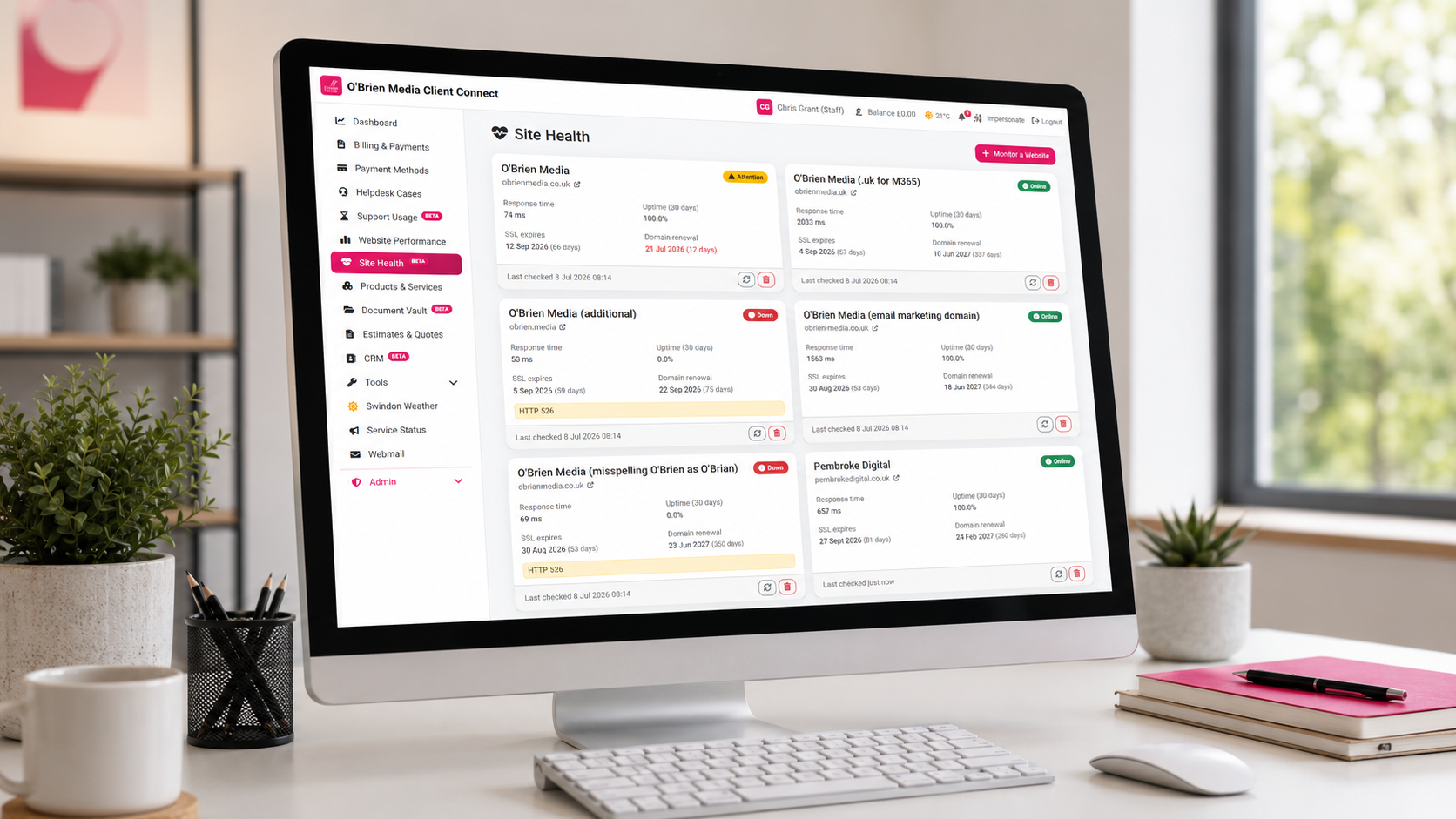
One of the biggest improvements added this week is the new site health monitoring area.
For many small businesses, a website is one of those things that quietly sits in the background until something goes wrong. A domain expires. A website goes offline. DNS settings are changed incorrectly. None of these things are ideal, and they are often avoidable if the warning signs are spotted early enough.
Client Connect now includes better visibility of key website health checks, including domain expiry alerts, uptime monitoring and DNS checks.
That means customers can see important website status information at a glance, including whether their domain is approaching renewal, whether their website is currently online, and whether the domain is configured correctly.
The new dashboard status card is designed to make this simple. Rather than presenting customers with lots of technical detail, it gives a quick view of the main things that matter.
If a domain is due to expire soon, Client Connect can help highlight that before it becomes a problem. If a website unexpectedly goes offline, that can also be surfaced more clearly. It is all part of making website support more proactive, rather than only reacting when something has already gone wrong.
Document Vault
We’ve also added a new Document Vault to Client Connect.
This gives customers a secure place to access important documents connected to their account, such as agreements, contracts, guides, service documents or other useful files.
Over time, important documents can easily get lost in email threads, saved in the wrong folder, or shared with someone who later leaves the business. The Document Vault gives customers one central place to find the documents connected to their O’Brien Media account.
Documents can be downloaded whenever they are needed, without having to ask us to resend them. There are no download limits, so customers can access their documents as often as required.
The Document Vault also supports version history. That means older documents can remain available for reference, while newer versions can be added when things are updated.
From a security point of view, documents are stored securely in the database and are not left exposed on disk. Access is connected to the customer account, helping keep documents organised and protected.
It is a simple feature, but one that should save time for customers who need quick access to key account information.
Service Status and Announcements
The third major update is the addition of service status and announcement features.
When there is planned maintenance, a wider platform issue, or an important service update, customers should not have to guess what is happening. Clear communication matters, especially when websites, hosting, email or support systems are involved.
Client Connect can now show important service announcements directly on the dashboard. This means customers can quickly see if there is a current issue, planned maintenance, or anything else they should be aware of.
There is also a dedicated service status area, giving clearer visibility over the current health of our services. This helps customers understand whether an issue is specific to their own website or part of a wider service event.
The new status features also support historical information, so past incidents and updates can be reviewed. That gives customers more transparency around what happened, when it was resolved, and how services have performed over time.
Why These Updates Matter
A lot of website support is about preventing small issues from becoming big ones.
A domain expiry date may not seem urgent until a website or email stops working. A brief outage may go unnoticed unless someone spots it. An important agreement may not seem hard to find until it is needed quickly.
These Client Connect updates are about reducing that friction.
They give customers better visibility, faster access to important information, and clearer communication when something affects their website or services.
For small businesses, that matters. Most business owners do not want to spend their time checking DNS settings, monitoring uptime, looking through old email threads or trying to work out whether a service issue is known. They just want to know that the important things are being watched and that the right information is easy to find.
That is exactly what these updates are designed to support.
A More Useful Customer Portal
Client Connect has always been about making website support more joined up. These latest updates move it another step forward.
Customers can now use Client Connect to:
- Check key website health indicators
- See domain expiry warnings
- View website uptime status
- Access important account documents
- Download files without searching through emails
- View service announcements and maintenance updates
- Check current and historical service status information
It is part of our wider commitment to making website support clearer, more proactive and easier to manage for small businesses.
We’ll continue improving Client Connect over time, adding features that help customers get more value from their website support and stay better informed about the services they rely on.
If you are an O’Brien Media customer, you can log in to Client Connect to see the latest updates in your account.